
What Is a Blocklist and How Does It Protect Your Ad Inventory?
In programmatic advertising, publishers monetize websites by connecting to multiple demand partners. While this increases revenue, it reduces control over creatives. To maintain quality, publishers must implement a robust ad inventory blocklist to filter unwanted demand and protect their brand.
As a result, publishers need effective tools to manage ad quality and protect their inventory. One of the key mechanisms used for this is a blocklist.
What Is an Ad Inventory Blocklist?
From a publisher’s perspective, a blocklist is a set of rules used to prevent specific ads from appearing on their website.
Blocklists can be applied to:
- Advertiser domains
- Specific creatives
- Content categories (e.g., gambling, political ads)
- Landing pages
The goal is to ensure that ads shown on the publisher’s website align with their brand, audience expectations, and internal policies.
How an Ad Inventory Blocklist Works on the Publisher Side
When a user visits a website, an ad request is sent to multiple SSPs (supply-side platforms), which then run auctions among advertisers.
The challenge for publishers is that:
- Ads can come from many different demand sources
- It is not always easy to identify which SSP delivered a specific ad
- Control mechanisms vary across platforms
Publishers typically start managing ad quality in platforms like Google Ad Manager, where they can:
- Review creatives
- Identify unwanted ads
- Manually block advertisers or categories
However, this approach does not scale well.
How Blocklisting Works in the Prebid Ecosystem
While Prebid supports ad inventory blocklists through standard OpenRTB controls – such as blocked advertiser domains (badv), categories (bcat), and creative attributes (battr) – it does not maintain a centralized blocklist. Instead, Prebid serves as an infrastructure layer in which blocking decisions are decentralized, often relying on rules provided by third-party fraud-prevention and brand-safety vendors such as IAS, DoubleVerify, or Pixalate. These rules can vary significantly between implementations depending on a publisher’s specific exchange relationships and verification partners. Furthermore, third-party security solutions like Boltive complement these efforts by focusing on blocking malicious or malware-related ads at the publisher level; however, such tools are primarily designed for technical security rather than providing granular control over specific advertisers or categories.
SSP-Level Blocklists (Supply-Side Platforms)
Beyond the wrapper, individual Supply-Side Platforms (like Magnite, PubMatic, or Xandr) maintain their own internal blocklists.
Direct Demand Control: These lists are essential for blocking demand from “Direct” or “Private Marketplace” (PMP) deals that might bypass the standard header bidding rules.
The main drawback of relying solely on SSP blocklists is fragmentation. If a publisher blocks an advertiser on SSP “A” but forgets to do so on SSP “B,” the unwanted ad may still leak through.
Use SSP-level blocking as a secondary “fail-safe” layer, while utilizing a centralized Prebid blocklist as your primary management tool to ensure consistency across the stack.
How Ad Inventory Blocklists Work in Google Ad Manager (GAM)
Because Google Ad Manager (GAM) is the central hub for most publishers, it is usually the first line of defense for ad quality. In GAM, blocklisting is primarily handled through two features:
- Protections: Publishers can create rules to block specific advertiser URLs, general categories (e.g., Apparel, Finance), sensitive categories (e.g., Politics, Gambling), or specific brands from appearing on their inventory.
- Ad Review Center: This is a visual dashboard that allows publishers to review individual creatives that have recently served (or are queued to serve) and manually block specific ad IDs.
The GAM Limitation in a Header Bidding World. While GAM’s built-in blocklists are highly effective for controlling ads served through Google Ad Exchange (AdX), Open Bidding, and direct deals, they have a major blind spot: client-side Prebid demand.
When publishers use header bidding, SSPs run their auctions before the ad request ever reaches GAM. If an SSP does not respect GAM’s blocklist (or if the wrapper isn’t perfectly synced), an unwanted ad can win the SSP auction and render on the page, completely bypassing GAM’s protections. This loophole is why relying solely on GAM isn’t enough for modern publishers, and why managing SSP demand requires a different approach.
How to Block the Advertiser in Google Ad Manager
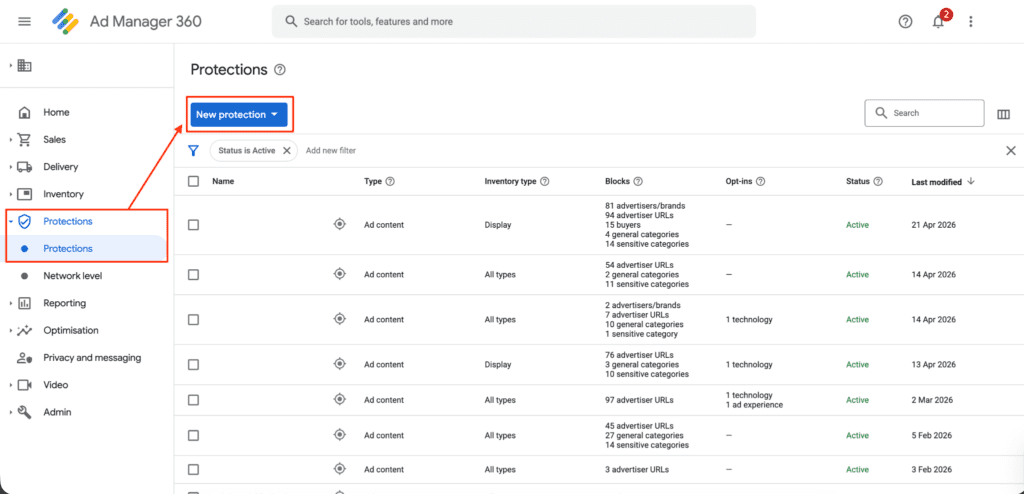
Begin by opening the Protections panel from the left-hand side of the main menu:
If you want to exclude the advertiser from the whole inventory, search for the default PROTECTION RULES:
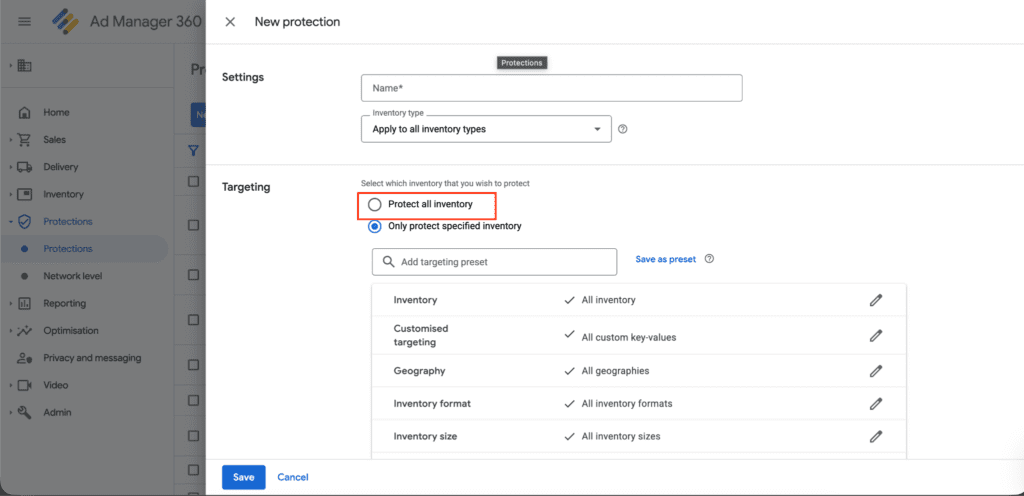
Open the default protection rule and add the landing page address that the intrusive ad redirected you to.
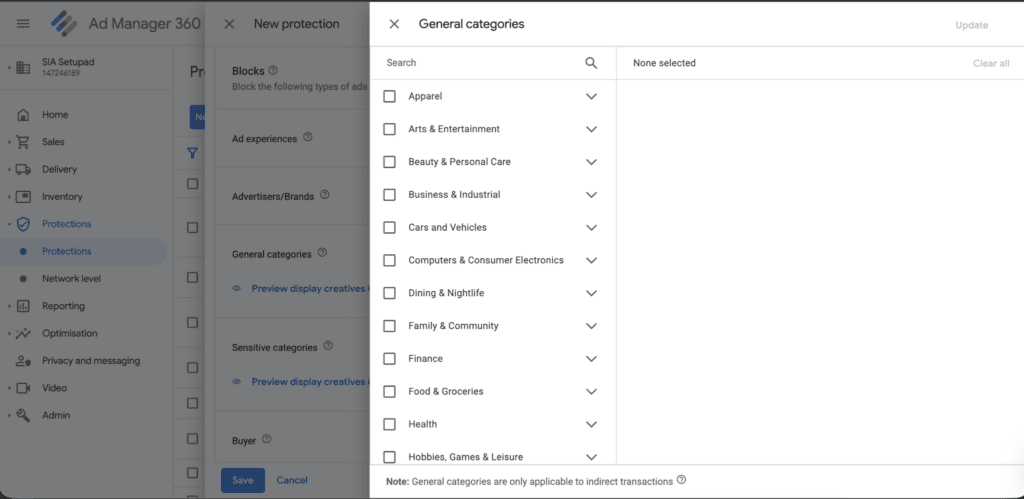
It is also possible to select a specific category to block:
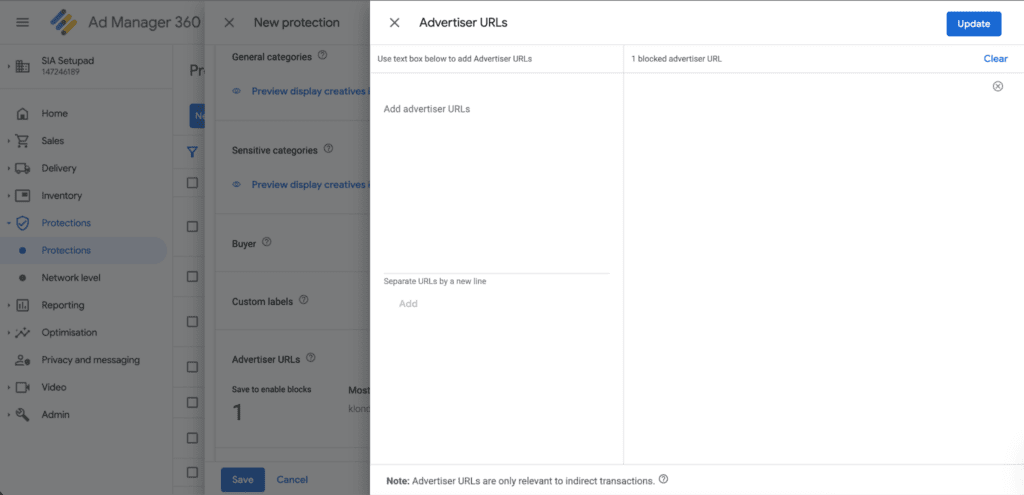
Or select a specific URL to block:
What if you only have a screenshot of the intrusive creative, or nothing at all, leaving you to guess the ad’s landing page? Google Ad Manager’s Ad Review Center can help you block unwanted advertisers.
From the menu on the left, go to Delivery, then select Creatives to open the Ad Review Center.
From the screenshot (if you have it), cut the actual creative, save it as a new image, and upload it to the Ad Review Center:
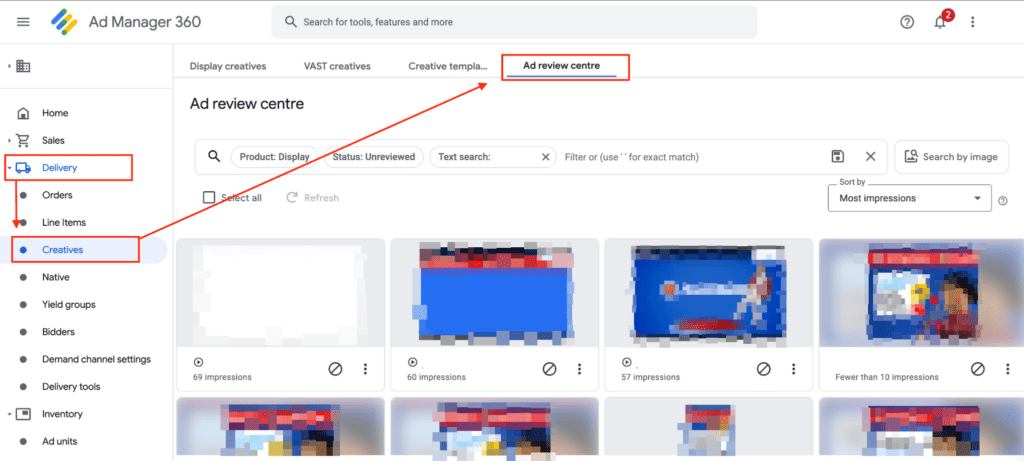
If you don’t have any reference at all, not even a screenshot, but your inventory isn’t too large, you can browse through the Ad Review Center and look for the ad manually. In the process, you might discover additional ads worth blocking. Just keep in mind that excessive blocking can reduce competition and potentially lower your overall revenue.
The Real Challenge of Multi-SSP Blocklist Management
As publishers grow and add more demand partners, blocklist management becomes increasingly complex.
Key challenges include:
1. Fragmentation: Some SSPs have their own interface and blocklist system, but some SSPs need to be contacted via email. Publishers must apply the same rules repeatedly across platforms.
2. Manual Workload: Blocking unwanted ads often starts with manually identifying them (sometimes via screenshots), then updating blocklists individually in each SSP.
3. Lack of Transparency: It can be difficult to determine exactly where a specific ad came from, especially in header bidding environments.
4. Scalability Issues: The more SSPs a publisher works with, the harder it becomes to maintain consistent blocklists across all demand sources.
Why an Ad Inventory Blocklist is Critical for Publishers
For publishers, blocklists are not just about brand safety — they are part of overall inventory quality control.
They help:
- Prevent low-quality or misleading ads
- Maintain user trust
- Ensure compliance with internal or external policies
- Protect long-term revenue by improving ad experience
Centralizing Blocklist Management
To address these challenges, publishers increasingly seek to centralize blocklist management.
Instead of managing rules separately in each SSP, centralized solutions allow publishers to:
- Define blocklist rules once
- Apply them across multiple demand partners
- Reduce manual effort
- Ensure consistent enforcement
Setupad’s Prebid Blocklist Feature
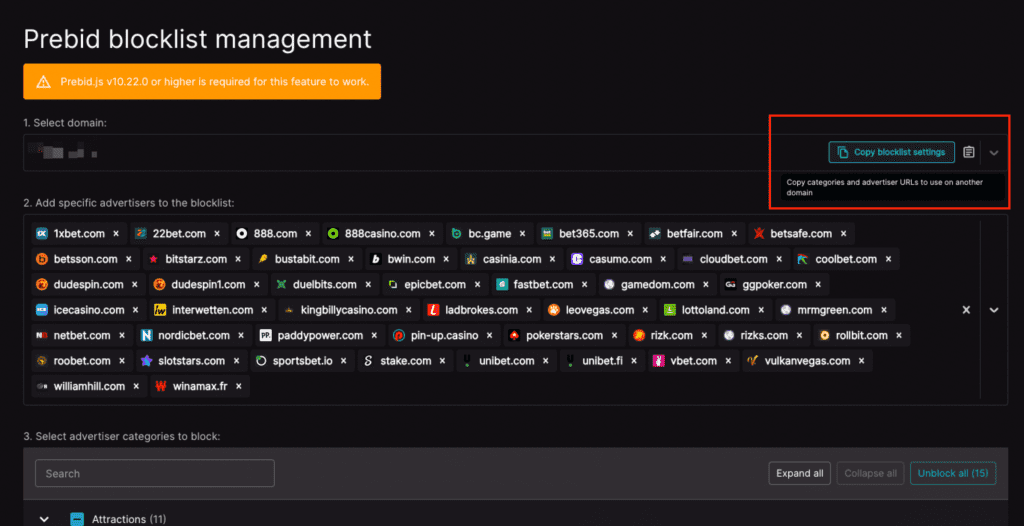
Setupad’s blocklist feature is designed specifically for publishers working with multiple Prebid demand partners and is available to all Setupad Self-Serve clients.
It operates at the website level and evaluates incoming ads in real time.
Key benefits:
Centralized Control
Publishers can manage ad inventory blocklist rules in one place instead of across multiple SSP interfaces.
Granular Blocking
Rules can be applied to:
- Advertisers
- Domains
- Categories
Real-Time Enforcement
Unwanted ads are blocked before they are rendered on the page.
Reduced Operational Complexity
This approach eliminates the need to manually update blocklists across each demand partner.
Note: The feature applies to SSP demand and does not block ads served directly through Google Ad Manager.
Setupad’s Chrome Extension: Ad Blocking Function
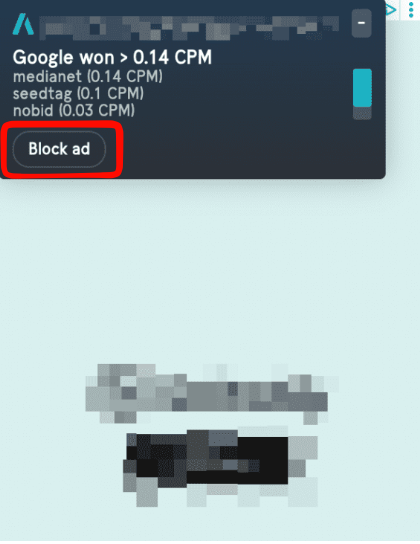
The primary functionality of the Setupad Chrome extension, available to all Setupad clients, is to report unwanted ads. By clicking the “Block ad” button and then clicking the banner, the extension will collect all necessary information for Setupad to successfully block the specific advertiser. With additional real-time blocking software, Setupad avoids malicious ads and ensures premium ad quality for all users.
Summary: Blocking Methods at a Glance
| Feature | Google (GAM) | Setupad Prebid | Individual SSP |
| Demand Coverage | Google Demand Only | All Header Bidding Demand | Specific SSP Demand Only |
| Management | Centralized for Google | Centralized (Single Dashboard) | Decentralized (Manual per SSP) |
| Workflow | Manual: Requires sorting “Unclassified” entities | Automated: One-click global synchronization | Fragmented: Manual entry across multiple platforms |
| Technical Basis | Internal Google Logic | ORTB2 Blocking Module | Proprietary SSP Logic |
| Blocking Timing | Reactive / Post-bid (Creative Review | Proactive / Server-side (Bid Rejection) | Bidder-side |
| Management Efficiency | Medium (Manual mapping for unclassified buyers) | High (One-click automation) | Low (Fragmented) |
Conclusion
Ad inventory blocklists are an essential tool for publishers to maintain control over their ad inventory in a complex programmatic ecosystem.
However, managing blocklists across multiple SSPs can quickly become operationally overwhelming. Fragmentation, manual processes, and limited transparency make it difficult to ensure consistent ad quality.
Centralized solutions like Setupad’s blocklist feature help solve this by simplifying management and enforcing rules across all connected demand partners in real time.